 Salesforce Studio
 JetBrains pluginsNew
 Code Guard
 Auto Rename Tag
 Todo Tree
 Error Lens
 Path IntelliSense
 npm IntelliSense
 Query Lens
 Container Studio
 API Client
 Port Manager
 Live Server
 Hotspots
 Rewind
 CodeSnap
 Git Graph
 Document Viewer
 Env
 MCP Studio
 Code Garden
 Wrapped
 Pets
The blast radius of your changes
Next to your commit box: every file that depends on what you changed, with a count on the view and in the status bar.
 VeyraSTUDIO

Know what your change can break, before you commit.
You changed one file. What else did you just change? Blast Radius follows every import in your project backwards and shows every page, API route, component and test that depends on what you edited. Then it runs only the tests that matter.
flightcoders.veyra-blast-radius · v1.0.0 · Free · MIT · Windows, macOS, Linux
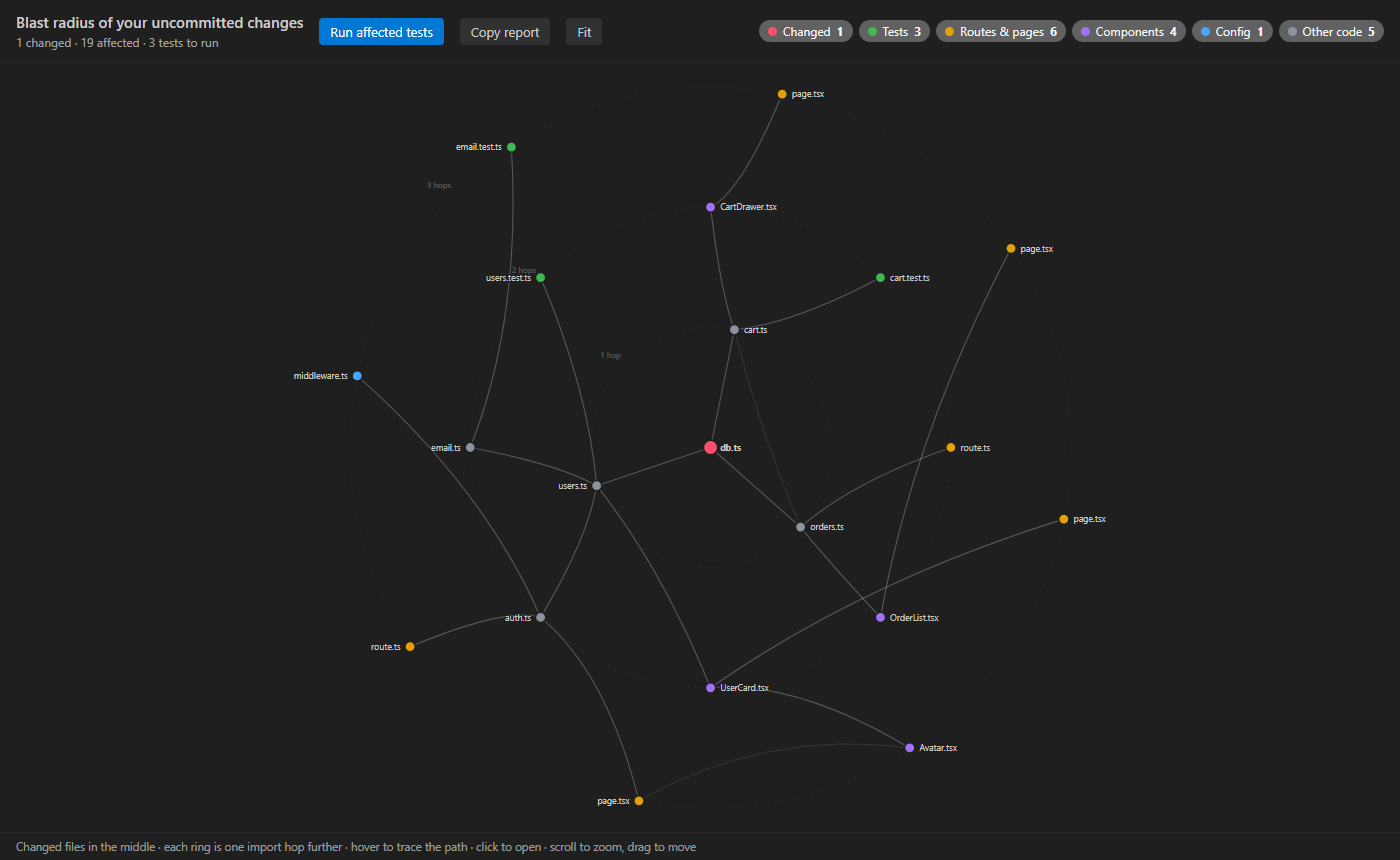
Next to your commit box: every file that depends on what you changed, with a count on the view and in the status bar.
Tests to run, pages, routes and APIs, components, config and middleware, and other code. The important ones first.
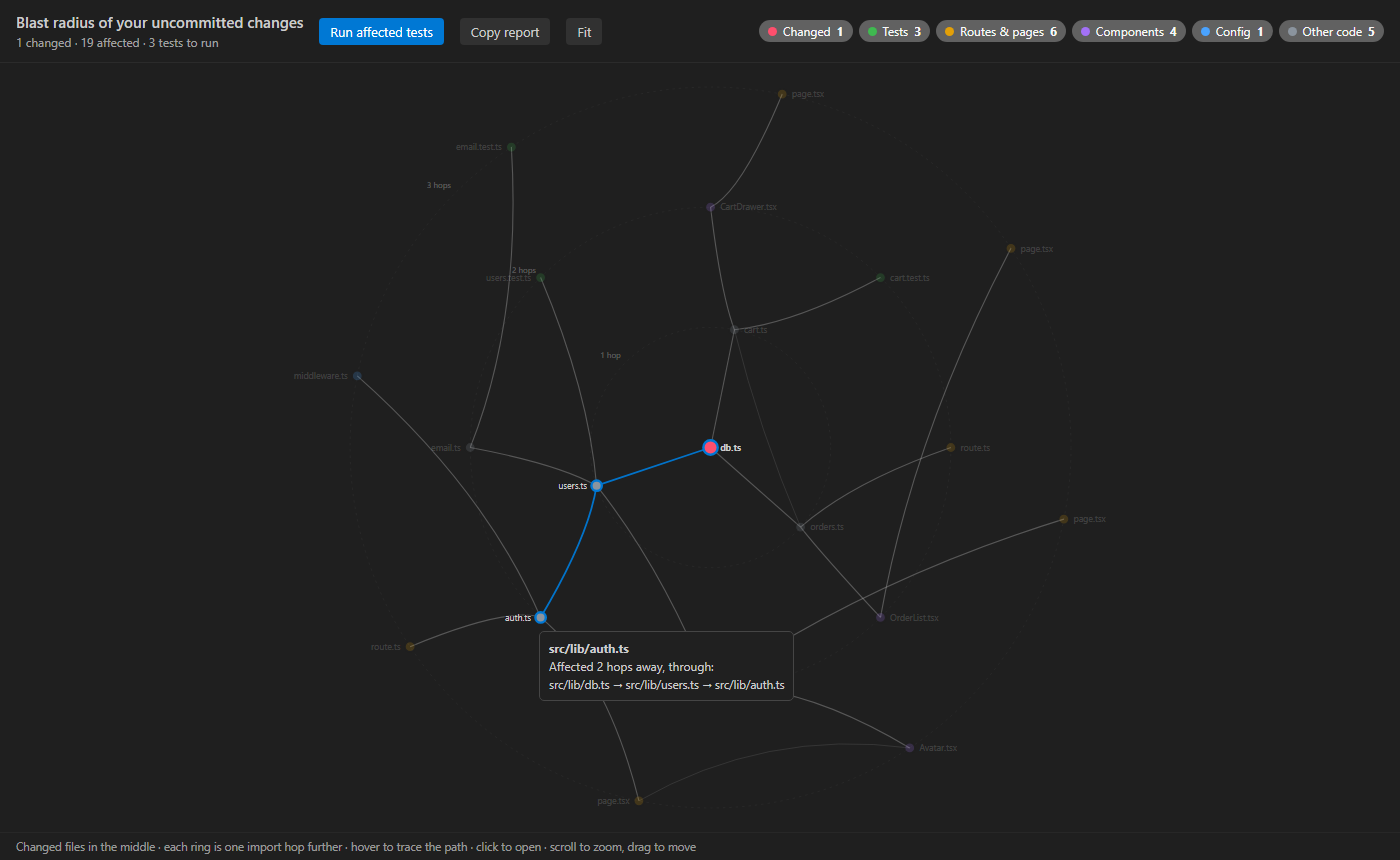
Your changes in the middle, every ring one import further. Hover a file to see exactly how your change reaches it.
One click runs just the tests that depend on your change, with Vitest, Jest, Mocha, Playwright, node --test or pytest.
The top of every file shows how many files import it and how far a change would reach, before you touch it.
Blast Radius still shows every file that imported it, because those are exactly the ones that break.
Copy a Markdown summary of what your change affects and which tests to run, ready for your pull request.
JavaScript, TypeScript, Vue, Svelte, Astro and Python. tsconfig path aliases like @/components, monorepos and Next.js routes.
It reads your files and runs git status, and that is all. No account, no telemetry, nothing sent anywhere.
Hover any file in the graph and the path from your change lights up: “Affected 2 hops away, through src/lib/db.ts → src/lib/users.ts → src/lib/auth.ts”. Click it to open the file.
Pairs well with Git Graph Veyra for your history and Error Lens Veyra for problems on their lines.
Yes. Veyra Blast Radius is free and MIT licensed, with no account and no telemetry.
Every file that could behave differently because you changed a file: the files that import it, the files that import those, and so on. If you change a database helper, that can be a handful of services, the pages that use them and the tests that cover them.
JavaScript and TypeScript (including JSX, ESM and CommonJS), Vue, Svelte, Astro and Python. It follows path aliases and baseUrl from tsconfig.json and jsconfig.json, including several in a monorepo.
It asks git for your uncommitted changes: staged, unstaged and new files. You can also see the blast radius of any file, from the Explorer, an editor tab, or the Used by line at the top of the file.
Only when you click Run Affected Tests. It picks Vitest, Jest, Mocha, Playwright, node --test or pytest from your project, or uses the command you set.
No. It reads only the import lines, so thousands of files are mapped in seconds, and the map is updated as you save.
More for VS Code: Veyra Query Lens for MongoDB, Veyra Container Studio for Docker, Veyra API Client and Veyra Port Manager. Or browse all 22 Veyra extensions.
Veyra Studio is a fast, free code editor with Live Server, Python debugging and Search Everywhere built in.