 Salesforce Studio
 JetBrains pluginsNew
 Code Guard
 Auto Rename Tag
 Todo Tree
 Error Lens
 Path IntelliSense
 npm IntelliSense
 Blast Radius
 Query Lens
 Container Studio
 API Client
 Port Manager
 Live Server
 Hotspots
 Rewind
 CodeSnap
 Git Graph
 Document Viewer
 Env
 MCP Studio
 Aura
 Code Garden
 Wrapped
 Pets
Values at the end of the line
console.log, info, debug, warn and error, shown right after the line that printed them, as your program runs.
 VeyraSTUDIO
See what your code prints, right next to the line that printed it.
Stop jumping between your code and the terminal to work out which console.log printed what. Run your Node.js code as usual, and every value, warning, error and crash appears at the end of its line, live.
flightcoders.veyra-live-values · v1.0.0 · Free · MIT · Windows, macOS, Linux
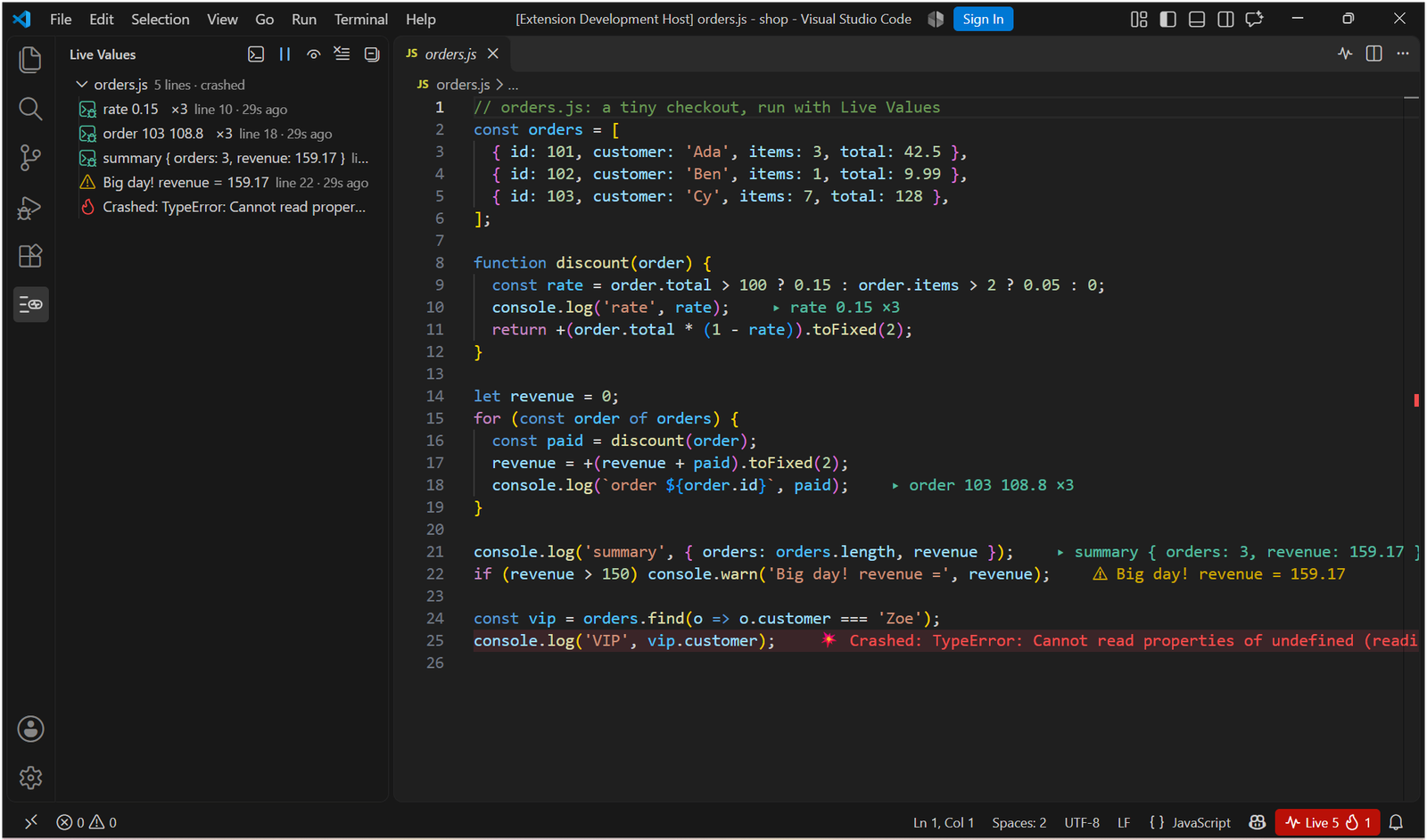
console.log, info, debug, warn and error, shown right after the line that printed them, as your program runs.
An uncaught exception or unhandled rejection marks the line that threw, in red, with the error message.
A line that runs twelve times shows ×12 and its latest value. Every new run starts clean.
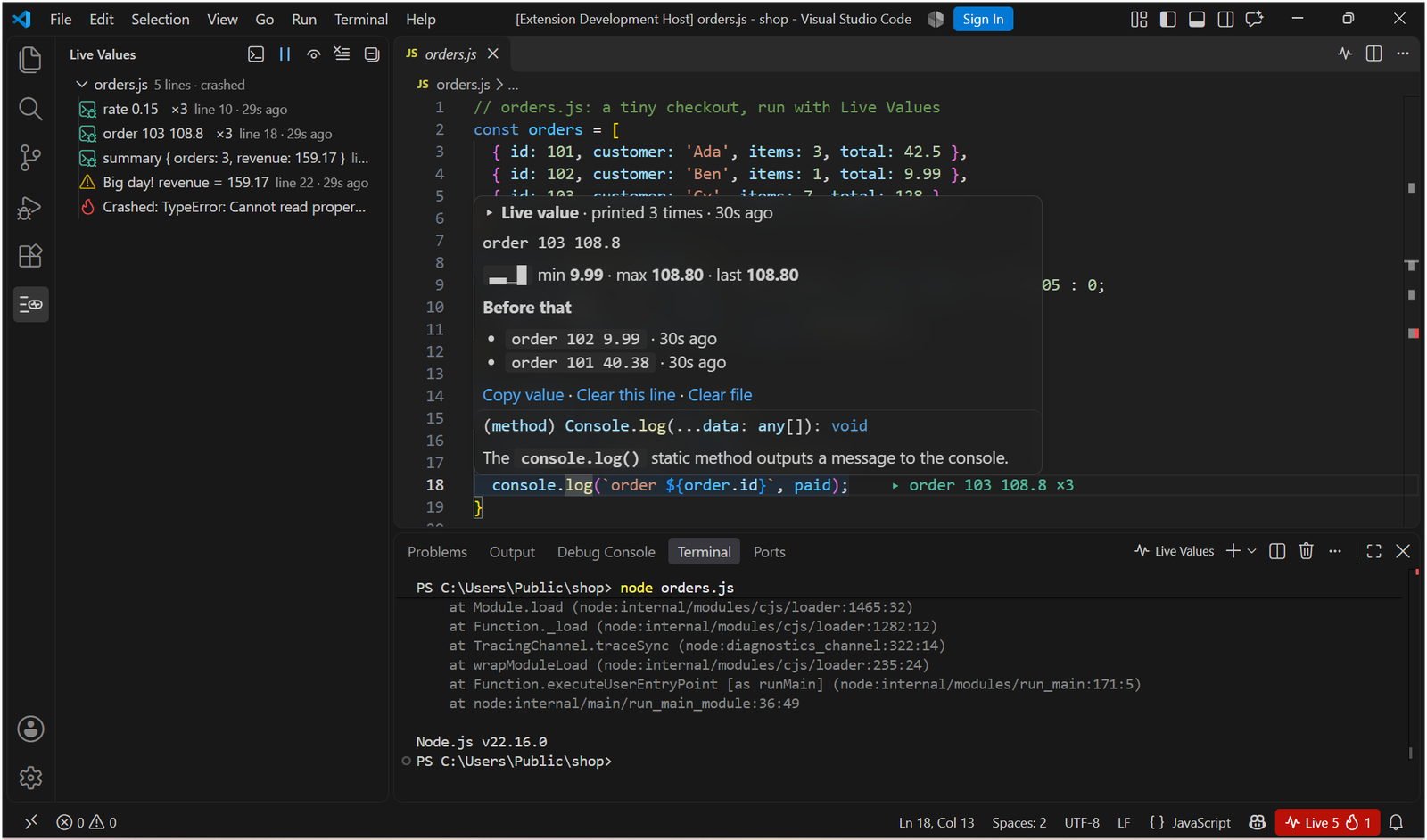
Hover a line that prints numbers for a tiny chart of them, with the minimum, maximum and last value.
Objects in full, the values printed before, and links to copy or clear them.
Every line that printed, by file, with warnings and crashes flagged. Click one to jump to it.
JavaScript or TypeScript, from the editor’s title bar. Or run anything in any VS Code terminal: node, npm run dev, tsx, nodemon.
Node debug sessions (F5 and launch.json) get live values too, and TypeScript values land on your .ts lines.
A small hook writes what your code prints to a file on your computer. Only your project’s code is recorded, and nothing is sent anywhere.
The full value with objects expanded, how many times it printed, a chart of the numbers, and the values before it. Here, a log inside a loop printed three orders: 40.38, 9.99 and 108.8.
Pairs well with Error Lens Veyra, which shows problems at the end of their lines, and Veyra Port Manager for the servers you start.
Yes. Veyra Live Values is free and MIT licensed, with no account, no paid tier and no telemetry.
It adds a small hook to Node.js in VS Code’s terminals (through NODE_OPTIONS). The hook notes each console call with its file and line and writes it to a file on your computer, and the extension shows the values in the editor. It never changes what your program prints or how it behaves.
No. Keep using console.log. Run your code in a VS Code terminal opened after installing the extension (or click Run This File) and the values appear.
Yes. With tsx, ts-node, or tsc with source maps, values land on your .ts lines. Run This File runs TypeScript with tsx.
Live Values sees code that runs in Node.js: servers, scripts, CLIs, tests and the server side of full-stack apps. Code that runs in the browser isn’t covered yet.
The same idea, values next to your code, but free with no paid tier, open source, and 100% local. It works with the terminal and tools you already use.
More for VS Code: Veyra Blast Radius, Veyra Query Lens for MongoDB, Veyra Container Studio for Docker and Veyra API Client. Or browse all 24 Veyra extensions.
Veyra Studio is a fast, free code editor with Live Server, Python debugging and Search Everywhere built in.