 Salesforce Studio
 JetBrains pluginsNew
 dxrayNew
 veyra-snap
 JSON ViewerNew
 Live Server
 API Client
 Git Graph
 Error Lens
 MCP Studio
 Container Studio
 CodeSnap
 Live Values
One keystroke
Shift+Alt+P opens a search box with every project. Type a few letters, press Enter, and you’re there.
 VeyraSTUDIO
Switch between your projects in a keystroke.
Save the folders you work in, find every Git repository on your disk, and jump back to recent folders, all from one sidebar and one search box. Press Shift+Alt+P, type, Enter.
flightcoders.veyra-project-manager · v1.0.0 · Free · MIT · Windows, macOS, Linux
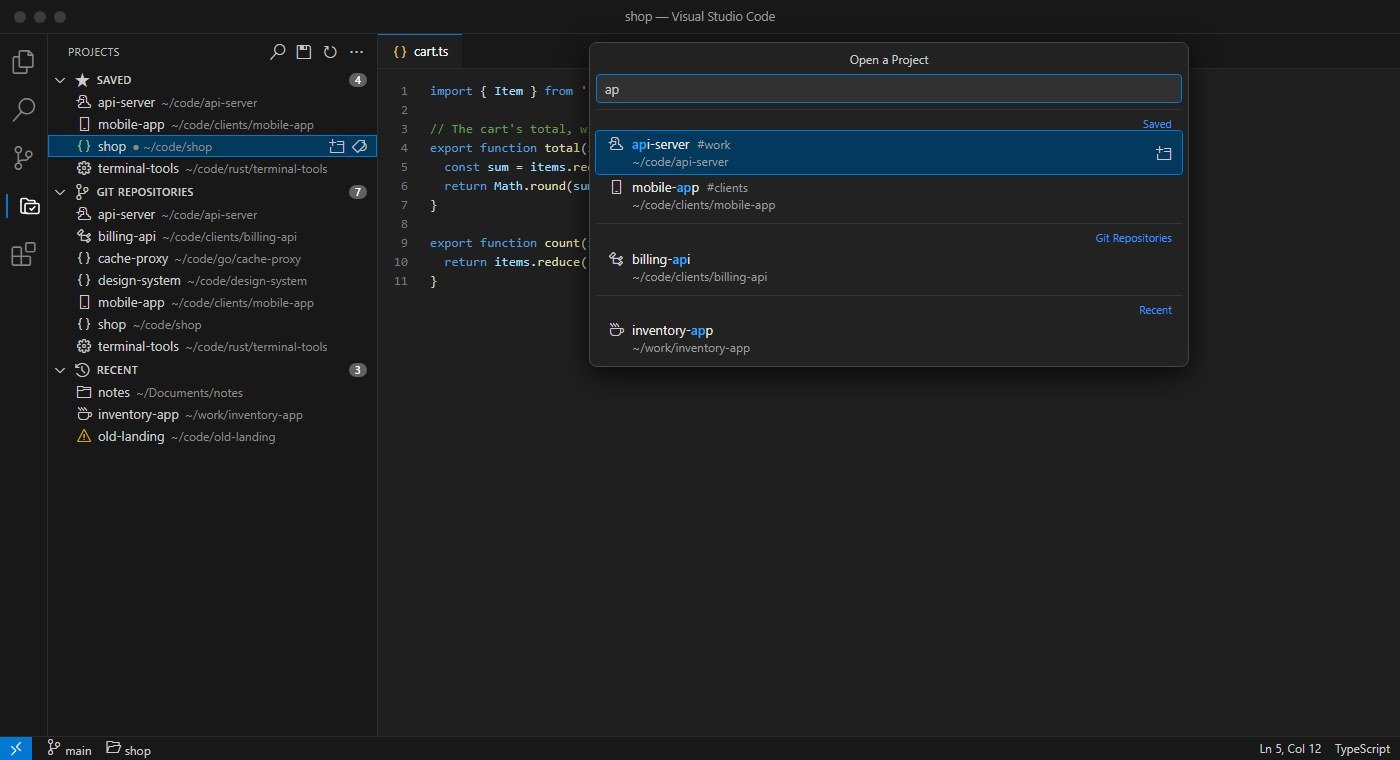
Shift+Alt+P opens a search box with every project. Type a few letters, press Enter, and you’re there.
Save the open folder, or any folder from the Explorer, with a name you choose. They stay at the top.
Choose the folders you keep code in and every repository inside shows up. node_modules, build output and hidden folders are skipped.
The folders VS Code opened lately, right in the sidebar, without digging through File → Open Recent.
Tag projects work, clients or learning, group the sidebar by tag, and sort by name or by the most recently opened.
Node.js, Python, Rust, Go, Java, .NET, PHP, Ruby, Dart and C/C++ projects each get their own icon.
The project’s name in the status bar. Click it to switch. Open any project here, in a new window, or in a terminal.
Edit it by hand, keep it in a synced folder to share it between computers, or bring the one from another project manager.
Nothing is sent anywhere, and your folders are never touched: removing a project only takes it off the list.
Pairs well with Git Graph Veyra, which draws your repository's history.
Yes. Project Manager Veyra is free and MIT licensed, with no account and no telemetry.
Press Shift+Alt+P, type part of the name and press Enter. Use the window button next to a project to open it in a new window, or set veyraProjects.openInNewWindow to always do that.
Run “Add a Folder to Look for Git Repositories In” and pick the folders you keep code in. It looks up to 4 folders deep (veyraProjects.scanDepth) for folders with a .git inside, and skips dependencies, build output and hidden folders.
Yes. Set veyraProjects.projectsLocation to a folder that syncs, like OneDrive, Dropbox or iCloud, and every computer uses the same projects.json.
Yes. It reads the same projects.json format. Point veyraProjects.projectsLocation at the folder that holds yours.
It is an independent extension, written from scratch, with Git repositories, recent folders and saved projects in one list, and an icon for each kind of project.
More for VS Code: Veyra Hotspots, Veyra Rewind, CodeSnap Veyra and Git Graph Veyra. Or browse all 26 Veyra extensions.
Veyra Studio is a fast, free code editor with Live Server, Python debugging and Search Everywhere built in.